 Chris Robert
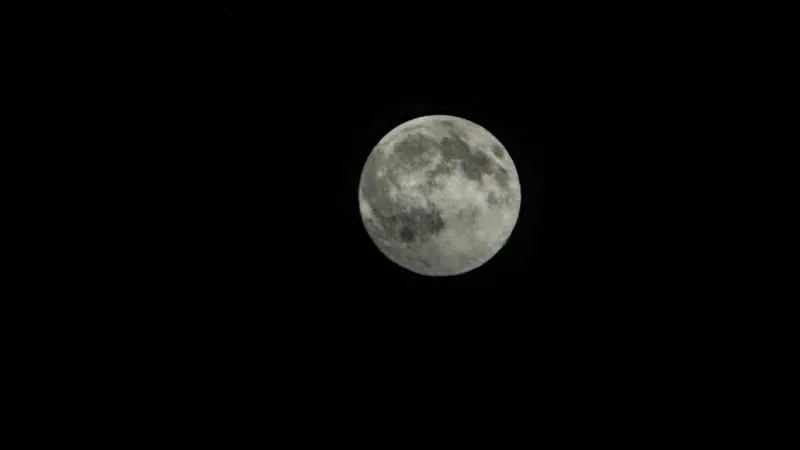
Aspiring astrophotographers can now elevate their mobile photography, capturing remarkable images of the Moon directly with their iPhone, regardless of the model. This comprehensive guide unveils essential techniques and settings, transforming your everyday smartphone into a capable tool for stunning lunar photography on any clear night.
The advent of advanced computational photography within Apple devices has democratized access to what was once a highly specialized field. Modern iPhones, equipped with sophisticated camera systems, offer capabilities that far surpass earlier mobile devices, making impressive celestial captures within reach for amateur enthusiasts.
Key to successful iPhone Moon photography is understanding your device's limitations and strengths. While a dedicated telescope or DSLR camera still offers unparalleled detail, iPhones excel in their portability and the integrated software processing that simplifies complex photographic tasks.
To begin, location and timing are paramount. Seek out a dark sky location, far from city light pollution, and plan your shoot during a clear night when the Moon is high in the sky. A full or nearly full Moon often provides the most dramatic results, though crescent phases offer unique artistic opportunities.
Essential camera settings must be adjusted manually or via third-party applications. Disable the flash and HDR, and manually set your focus to infinity. Lowering the ISO sensitivity helps reduce noise, while experimenting with shutter speed is crucial to balance light capture without overexposing the bright lunar surface.
For newer iPhone models featuring multiple lenses, specifically the telephoto lens is your greatest asset. Zoom in digitally or optically as much as possible without compromising image quality. Some advanced models, like the iPhone 15 Pro Max, offer significantly improved optical zoom capabilities that enhance distant subjects.
Stability is another critical factor. Even the slightest camera shake can blur a distant subject like the Moon. Utilizing a sturdy tripod, coupled with an iPhone mount, is highly recommended. Employing the self-timer function or a remote shutter release further minimizes vibrations during capture.
Consider using ProRAW format if your iPhone supports it. This feature captures more data from the sensor, providing greater flexibility for post-processing adjustments without degrading image quality. For those interested in exploring beyond our immediate celestial neighbor, understanding phenomena like Astronomers Uncover Vast Galaxy Without Stars, Challenging Cosmic Theories can provide further context to the vastness captured through these photographic efforts.
Post-processing within the iPhone's native Photos app or third-party editing applications can dramatically enhance your lunar images. Adjusting exposure, contrast, highlights, and shadows can bring out intricate details on the Moon's surface that might not be immediately apparent in the raw capture.
Resist the urge to over-process. Subtle enhancements yield more natural and credible results. The goal is to reveal the Moon's natural beauty, not to create an artificial representation. Focus on sharpness and clarity while maintaining a balanced exposure.
Dedicated telescopic adapters, which allow you to connect your iPhone directly to a telescope eyepiece, offer an even more advanced method for capturing stunning detail. These accessories bridge the gap between casual mobile photography and serious amateur astrophotography, providing significantly higher magnification.
Furthermore, explore burst mode for capturing multiple shots in quick succession. This increases your chances of getting a perfectly sharp image, especially when atmospheric conditions cause slight distortions or when the Moon is moving across the frame. Selecting the best frame from a series often yields superior results.
While the general techniques apply across various iPhone models, users of newer devices will benefit from features like improved low-light performance, larger sensors, and more advanced image stabilization. However, even older models can achieve impressive results with patience and the right approach.
The key takeaway for successful iPhone Moon photography is persistence. Experiment with different settings, angles, and conditions. Each lunar cycle presents new opportunities to refine your technique and capture unique perspectives of Earths natural satellite.
This burgeoning field of smartphone astrophotography is not only about capturing beautiful images but also about fostering a deeper connection with the cosmos. It makes the wonders of the night sky accessible to millions, proving that professional-grade equipment is not always a prerequisite for stunning visual artistry.
As technology continues to advance, future iPhone iterations are expected to push the boundaries of mobile photography even further, potentially integrating more sophisticated optical zoom systems and advanced AI-driven image enhancements that could revolutionize celestial imaging.
Transforming your iPhone into a formidable tool for lunar photography is a rewarding endeavor. With the right techniques, a bit of patience, and a clear sky, anyone can capture breathtaking images of the Moon, bringing the distant celestial body closer to home.